China Top 10 Facial Devices Why Is Mine Not Working?

Time:2026-09-29 Author:Sienna
0%

China’s top facial beauty devices promise brighter skin, firmer contours, and salon-like results at home. Yet many users eventually ask, “Why is my facial beauty device not working?” The answer may involve charging errors, weak contact, unsuitable skincare products, or unrealistic expectations.

Market research shows why this question matters. Grand View Research reported continued growth in the global beauty devices market, driven by home-use technology and portable tools. Statista has also tracked rising consumer interest in at-home skincare equipment, especially LED masks, microcurrent devices, and cleansing systems. However, popularity does not guarantee performance. A glowing indicator light is not proof that the treatment is effective.

Small details matter. A microcurrent device may fail when the skin is dry. An LED mask may appear ineffective after only three sessions. A cleansing brush can perform poorly when its silicone head is worn or improperly cleaned. I have also seen users confuse mild tingling with stronger treatment.

“Results are gradual and subtle,” board-certified dermatologist Dr. Hadley King has explained about LED therapy. That warning deserves attention. The American Academy of Dermatology also emphasizes consistent use and realistic expectations for many at-home treatments. The U.S. Food and Drug Administration advises consumers to follow device instructions and check safety information carefully.

This guide examines China’s top 10 facial devices through practical troubleshooting, manufacturer guidance, and professional evidence. It will separate a simple setup mistake from a possible battery, sensor, or hardware problem. Some devices may be overpromised. That is uncomfortable, but worth admitting.
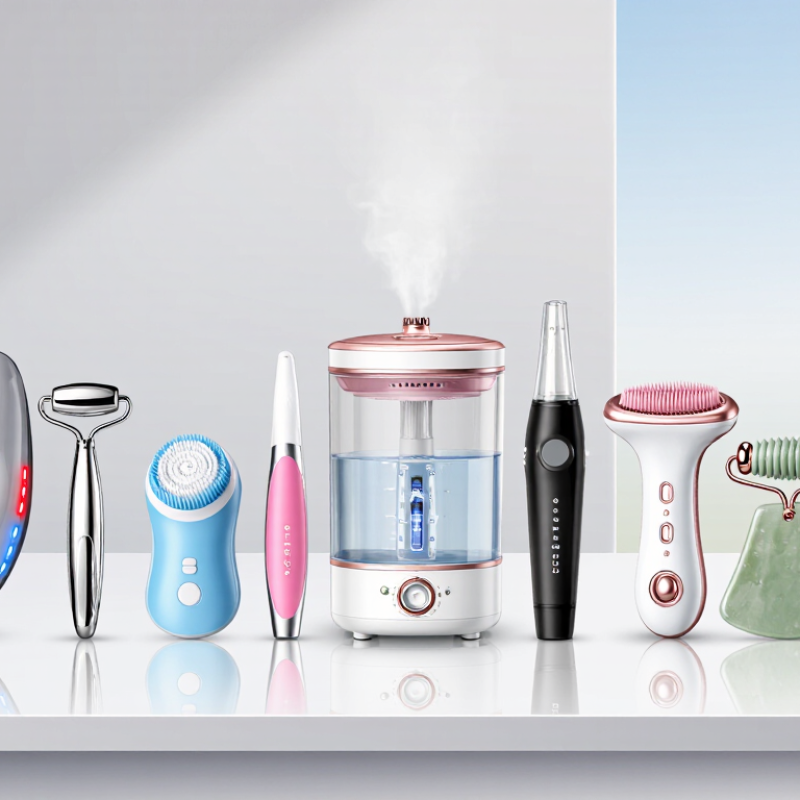
China Top 10 Facial Devices Why Is Mine Not Working?

Identify Your China Facial Device and Its Intended Function

China Top 10 Facial Devices: Why Is Mine Not Working?

Identify the device before testing it. Common categories include LED masks, microcurrent tools, radio-frequency devices, ultrasonic spatulas, ion cleansing tools, galvanic instruments, microdermabrasion units, cooling devices, EMS stimulators, and vibration massagers. Each has a different intended function. Red or blue light should produce visible illumination, not strong heat. A microcurrent tool may feel subtle, especially on dry skin. Radio-frequency equipment usually creates controlled warmth. It should not cause sharp pain.

Look at the device head, buttons, charging port, and instruction labels. A flat metal spatula needs conductive gel or water-based moisture. Without contact, it may appear inactive. A microcurrent device also requires complete contact across the skin. LED equipment may seem ineffective because results develop gradually, not after one session. According to the 2023 ISAPS Global Survey, more than 19 million nonsurgical aesthetic procedures were recorded worldwide. That growth increases consumer interest, but popularity does not prove every home device performs equally.

Check the power indicator, treatment mode, timer, and battery condition. Some devices lock their output when the sensor detects poor skin contact. Others need several hours to charge. Do not assume a silent device is broken. I have seen troubleshooting guides treat all facial tools alike, which is a serious weakness. The intended function matters more than the product’s appearance. If the manual gives unclear specifications, stop using the device and request measurable output information, safety instructions, and electrical compliance records from the seller.

Check Power, Charging, Connections, and Basic Operating Conditions

China Top 10 Facial Devices Why Is Mine Not Working?

Check Power, Charging, Connections, and Basic Operating Conditions

A facial device that suddenly stops may have a simple power problem. Press the power button firmly for three seconds, not just once. Check whether the outlet works with another safe household item. If the device uses a rechargeable battery, inspect the charging indicator carefully. No light may mean a loose cable, an unsuitable adapter, or a fully drained battery. Let it charge for the period stated in the user manual.

Look closely at every connection. The charging port should be clean, dry, and free from lint. A cable can appear connected while its plug sits slightly crooked. Try another compatible cable only when the manual allows it. Avoid forcing the connector. That can damage the port. I have sometimes blamed the device too quickly, while the real problem was a worn cable.

Basic operating conditions matter too. Some devices will not start unless the head touches clean, dry skin. Others require a separate power switch, a short button hold, or a locked safety mode. Remove excess serum, water, or packaging film from contact areas. If the device becomes unusually hot, smells burnt, or shows physical damage, stop using it. Contact the seller or a qualified service professional with the model number and charging details. Read the manual again. It sounds obvious, but it is often missed.

China Top 10 Facial Devices: Why Is Mine Not Working?

Basic operating conditions to verify before advanced troubleshooting

Each bar represents one essential condition that should be confirmed: adequate power, sufficient charging, secure connections, correct mode selection, clean contact surfaces, and proper skin contact. These are checklist requirements, not brand-specific failure statistics.

Review Settings, Skin Contact, and Correct Usage Procedures

China Top 10 Facial Devices: Why Is Mine Not Working?

Review Settings, Skin Contact, and Correct Usage Procedures

When a facial device appears inactive, check its settings before assuming it is broken. Confirm the battery, power button, treatment mode, and intensity level. Some devices will not activate until the selected mode is confirmed. Others pause when the timer starts or when the head loses contact with skin. Read the manual carefully, because control symbols are not always obvious. I have seen users mistake standby mode for a fault.

Clean, dry skin also matters. Remove makeup, sunscreen, oil, and heavy creams before treatment. Place the device flat against the skin, without pressing too hard. Small gaps can interrupt electrical contact or light delivery. If the instructions require a conductive gel, apply a thin, even layer. Too little may reduce contact. Too much can make the device slide.

Use slow, steady movements across the cheeks, jawline, and forehead. Avoid repeatedly treating one small area. Follow the recommended session time, even when the sensation feels mild. Higher intensity does not always produce better results. It may cause temporary redness or discomfort. Stop if you feel burning, sharp pain, or unusual irritation. I once increased the setting too quickly and regretted it; patience would have been wiser. If the device still fails, inspect the charging port and contact surfaces, then contact qualified support rather than opening the unit yourself.

China Top 10 Facial Devices: Why Is Mine Not Working? — Review Settings, Skin Contact, and Correct Usage Procedures

How to use this guide: These are ten common at-home facial device types, not a sales ranking. Check the device manual first; designs, settings, and suitable skin conditions vary by model.

Device Type Common Sign It Is Not Working Settings and Skin-Contact Checks Correct Usage Procedure Safety Reminder
Facial cleansing brush The brush does not rotate or vibrate, or cleansing feels uneven. Check the charge, power button, attachment fit, and selected mode. Keep the brush head gently against damp skin. Wet the face and brush head, apply a mild cleanser, and glide without pressing hard. Rinse and clean the head after use. Excess pressure or frequent use may irritate skin. Follow the manual’s recommended duration and replace worn brush heads.
LED light therapy mask or panel The lights do not turn on, the session stops, or no light is visible. Check battery or power connection, timer, selected light mode, and whether the mask is positioned as instructed. Some devices use non-visible wavelengths. Use on clean, dry skin for the device’s specified session time and distance. Use the supplied eye protection when required. Follow the manual’s eye-safety instructions. Ask a healthcare professional before use if you have a light-sensitive condition or take photosensitizing medication.
Microcurrent device No sensation is felt, or the device beeps or pauses during treatment. Confirm the intensity is not set to zero, the electrodes are clean, and the skin has the specified conductive gel. Maintain the contact pattern shown in the manual. Apply the recommended conductive medium and move the electrodes slowly along the device’s suggested paths; do not hold them on one spot unless instructed. Do not use on broken or irritated skin. Check the manual and consult a clinician if you have an implanted electronic device or a relevant medical condition.
At-home radio-frequency (RF) device The device does not heat as expected, or the temperature indicator does not respond. Check the chosen level, sensor contact, treatment head, and required conductive product. Some models limit output unless full contact is detected. Use only the supplied or specified gel, keep the treatment head moving as directed, and follow the manual’s area and time limits. Do not increase the level to compensate for poor contact. Avoid use over areas excluded by the manual, and stop if you feel pain or excessive heat.
Ultrasonic skin scrubber The blade vibrates weakly or seems to glide without loosening surface debris. Check charge, mode, blade orientation, and whether the skin is continuously wet. These devices generally require a moist surface to glide properly. Cleanse first, keep the skin damp, and sweep the blade gently at the angle specified by the manufacturer. Clean and dry the blade afterward. Do not scrape dry skin or press hard. Avoid inflamed, broken, or recently treated skin unless a qualified professional advises otherwise.
Ionic cleansing or infusion device The mode changes but there is little perceived effect, or the device loses contact. Verify the selected mode, polarity setting if applicable, electrode cleanliness, and the required water-based product. Keep the electrode in steady contact. Use the product and sequence specified in the manual, move slowly over the intended area, and clean the electrode after use. Do not assume the device improves absorption of every product. Avoid use on irritated skin and follow any medication or ingredient cautions.
Facial steamer Little or no mist appears, or the unit shuts off before the session ends. Check the water level, reservoir placement, power supply, and whether the unit needs cooling or descaling. Use only the water type stated in the manual. Place the unit on a stable surface and keep your face at the manufacturer’s recommended distance. Use the prescribed session length. Steam can cause burns. Do not lean close to the nozzle, add essential oils unless expressly permitted, or use if heat worsens a skin or health condition.
Facial pore vacuum The suction is weak, inconsistent, or the device leaves temporary marks. Check the charge, filter, nozzle fit, and suction level. Keep the nozzle moving on clean, dry skin rather than holding it in place. Start at the lowest setting and test a small area. Use brief, continuous passes only as directed in the manual. Strong suction can cause bruising or broken capillaries. Avoid the eye area, active acne, and fragile or irritated skin; stop if marks or pain occur.
Facial dermaplaning tool The blade pulls, skips, or does not remove fine surface hair smoothly. Check that the blade is clean, undamaged, and attached correctly. Skin preparation and whether the manual specifies dry or lubricated skin matter. Follow the manufacturer’s preparation instructions, use light strokes, and do not repeatedly scrape the same area. Clean or replace the blade as directed. Do not use on active breakouts, cuts, or irritated skin. Keep the blade clean, do not share it, and avoid pressing hard.
Facial EMS or electrical muscle-stimulation device The device gives no pulses, or stimulation feels uneven from one side to the other. Check charge, mode, intensity, electrode cleanliness, and the required conductive gel. Ensure all contact points touch the skin as instructed. Apply the specified conductive medium and follow the device’s placement diagram and session limits. Begin at a low setting. Do not use over the front of the neck or other excluded areas. Review the manual’s contraindications and seek medical advice if you have an implanted electronic device or relevant health condition.

Basic troubleshooting: If a device will not power on, check its charge, cable, attachment, and power-button sequence. If it turns on but pauses, review its contact sensor, timer, temperature limit, and required skin preparation. Stop using it if it overheats, is damaged, or causes pain, burning, or persistent irritation.

Diagnose Common Faults in the Top Ten Facial Device Types

China Top 10 Facial Devices: Why Is Mine Not Working?

Facial devices fail for ordinary reasons before serious ones. Start with the basics. Check the charger, power indicator, treatment head, and skin contact. Grand View Research estimated the global beauty devices market at about US$31 billion in 2023, showing how widely these tools are used. Yet market growth does not guarantee correct operation or safe maintenance.

For LED masks, inspect broken lights and confirm the timer starts. Microcurrent and EMS devices often need conductive gel and full skin contact. Radio-frequency tools may pause when their temperature sensor detects poor movement or dry skin. Ultrasound spatulas can stop under excessive pressure. Cleansing brushes may lose power because moisture entered the charging port. Ion and galvanic devices commonly need the correct polarity and damp skin. Cryotherapy devices should be checked for blocked airflow or abnormal heat. Dermabrasion tools require clear filters and an unobstructed vacuum path.

A useful diagnosis begins with symptoms, not guesses. No light usually suggests power, charging, or circuit trouble. Weak stimulation may indicate dry contact, low battery, or a worn electrode. Uneven heating deserves caution. Stop using it. Fortune Business Insights reports continued expansion in the home-use beauty device sector, but rapid adoption can encourage careless troubleshooting. My own diagnostic bias is checking electronics too quickly. Skin preparation is often the real fault. Never bypass a safety sensor or continue with burning, swelling, or unusual noise. Consult the instruction manual or a qualified service technician when basic checks fail.

Know When to Reset, Repair, Replace, or Contact the Manufacturer

China Top 10 Facial Devices: Why Is Mine Not Working?

Facial devices can fail for simple reasons, including low battery, dirty charging pins, blocked sensors, or outdated software. A 2024 Grand View Research report estimated the global beauty devices market at over 40 billion US dollars. That growth also means more complex home equipment reaches consumers. Resetting should be your first controlled step, not repeated button pressing.

Turn the device off, charge it fully, and clean contact points with a dry cotton swab. Check the manual for a factory reset. Remove it from the app, then reconnect it. If heat, swelling, burning smells, cracked plastic, or unusual vibration appears, stop immediately. Do not open a sealed battery compartment.

Repair is reasonable when the casing is intact and the fault is limited to charging or software. Replacement makes more sense when output remains weak, the battery drains quickly, or repair costs exceed half the purchase price. That rule is practical, not perfect.

Tips:

Record the error light, purchase date, serial number, and charging behavior. Contact the manufacturer when resets fail, warranty coverage may apply, or the device repeats the same fault. A 2023 report from the International Trade Centre noted continued growth in personal-care technology trade, but quality varies across sellers. I sometimes underestimate setup errors. Still, persistent failure deserves professional inspection, not guesswork. Use only approved cables and compatible accessories.

FAQS

Why does my facial device seem inactive?

Check the battery, power button, mode, and intensity. Some devices need mode confirmation before starting. Check the manual, too.

Can poor skin contact stop a device?

Yes. Clean and dry your skin, then place the treatment head flat against it. Small gaps can interrupt contact. Start gently.

Should I use conductive gel?

Use it only when the instructions require it. Apply a thin, even layer. Too little may reduce contact; too much can make the device slip.

Why does my device give weak or uneven results?

A low battery, dry skin, or worn contact surface may affect performance. Check the specific device’s instructions. I tend to blame the battery first.

What basic checks help with different device types?

Check LED lights and timers on masks. Microcurrent devices may need gel and full contact. For cleansing brushes, inspect the charging port for moisture.

When should I stop using a facial device?

Stop if you feel burning, sharp pain, or unusual irritation. Stop using it. Uneven heating, swelling, or an unusual smell also needs attention.

How should I reset a device that still will not work?

Turn it off, charge it fully, and clean contact points with a dry cotton swab. Follow the manual’s reset steps. Avoid repeated button pressing.

When should I seek repair or consider replacement?

Contact qualified support if basic checks and resets fail. Repair may suit a minor charging issue. Replacement may be practical if output stays weak or repair costs are high. That rule is not perfect.

Conclusion

When a facial device stops working, start by identifying its device type and intended function, since cleansing brushes, LED tools, microcurrent devices, and other facial technologies have different operating requirements. Check the battery or power supply, charging cable, connections, and indicator lights. Then review the settings and instructions, make sure the device is in the correct mode, and confirm that it has proper contact with clean, dry skin where required.

If you’re wondering, “Why is my facial beauty device not working,” consider common faults associated with its specific type, such as a depleted battery, blocked contact surface, poor skin contact, or an unsuitable setting. Follow the device’s reset instructions if basic checks do not help, and stop using it if it becomes unusually hot, damaged, or unreliable. Depending on the problem and the device’s condition, repair, replacement, or contacting the manufacturer for guidance may be the safest next step.

Sienna

Sienna

Sienna is a skilled marketing professional with a deep expertise in our company’s core products and services. With a passion for innovation and detail, she plays a pivotal role in crafting insightful blog posts that not only highlight the unique features of our offerings but also provide valuable......